- Home Page /
- Office Products /
- Office Electronics /
- Other Office Equipment /
- Label Makers /
- Phomemo Label Maker, M220 Thermal Label Print...
0 ratings


Item #:
222897131
Phomemo Label Maker, M220 Thermal Label Printer | 3 Inch Bluetooth Barcode Printer Compatible with Andriod / iOS for Home, Office, Small Business,
 1 Sustainability Highlights
Item #:
222897131
QAR 246
Price Details
Excluding Shipping & Custom charges ( Shipping and custom charges will be calculated on checkout )
*All items will import from US
47%
In stock
 Imported from USA store
QTY:
Order now and get it around Tuesday, August 18
Secured transaction
Ubuy works hard to protect your security and privacy. Our advanced payment security system ensures confidentiality by encrypting your information during transmission using AES (Advanced Encryption Standards) and SSL (Secure Socket Layer) protocols. Your payment details are 100% secure as we do not share your payment details with third party sellers.
Our Top Logistics Partners


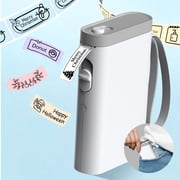
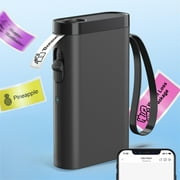
A handy multifunctional, versatile and compact device, it connects well with Bluetooth and the app making it easy to print labels using thermal technology.

Fast
Shipping

Free
Return*

Secure Packaging

100% Original Products

PCI DSS Compliance

ISO 27001 Certified


Note: Step Down Voltage Transformer required for using electronics products of US store (110-120). Recommended power converters Buy Now.


What Stands Out
Bluetooth Connectivity
Easily connect to smartphones and PCs via Bluetooth for seamless printing of labels, barcodes, and addresses, enhancing convenience and efficiency in your labeling tasks.
Portable Design
Compact and lightweight, the Phomemo M220 can be taken anywhere, making it perfect for on-the-go labeling needs without sacrificing functionality or print quality.
User-Friendly Interface
Designed for effortless operation, it features intuitive controls that simplify the labeling process, making it suitable for all users, from beginners to professionals.
Product Details
- Ultra-Portable Design: The Phomemo M220 label maker is compact and lightweight, featuring stable Bluetooth technology for easy printing from smartphones and tablets using the "Print Master" app. The label maker support print thermal label width rang from 0.78'' to 3.14'', NOT support print 4 x 6 shipping labels,Charging with 5V 2A, Don't use the charger that output above 5V
- Inkless and Cost-Effective: Utilize upgraded thermal technology for inkless printing, eliminating the need for ink, toner, or ribbons, and reducing costs compared to traditional label printers.
- Versatile Compatibility: The M220 label maker is compatible with Android, iOS, iPad, Windows 10/11, and Mac, making it suitable for both mobile and desktop use in various settings like home, office, and small businesses.
- User-Friendly Operation: Simply download the "Print Master" app, connect via Bluetooth, and start creating labels with the M220 thermal printer. For PC users, download the driver from the Phomemo website for seamless printing.
- Diverse Applications: Print text, barcodes, QR codes, images, addresses, and more with the "Print Master" app, which offers a vast library of icons and templates to simplify label creation.
- The Label Maker Complete Package - The box includes one Phomemo M220 label maker machine black, one M220 label maker storage case, an instruction manual, a USB data cable, one roll 40mm x 30mm thermal labels, one roll 60mm x 40mm thermal labels, one roll 70mm x 80mm thermal labels.
- Phone and Tablet Start Printing - Step 1: Download the App 'Print Master'. Step 2: Turn on the M220 label maker and your phone's or tablet's Bluetooth. Step 3: Click the 'Printer' icon in the App to search for the M220 portable label printer, connect it via Bluetooth in the App, select the label size, and edit the content to start printing
- Laptop/PC Starts Printing - Step 1: Please check your laptop/PC's operating system (OS) and download and install the correct M220 driver and the 'Labelife' app from the Phomemo website. Step 2: Use the USB data cable to connect the M220 label maker to your computer. Step 3: Select the label size, edit the content, and choose M220 from the printer list
- How to Clean the Print Head - Wipe the cut parts of the label maker, especially the black lines, with alcohol cotton to ensure that there is no adhesive or foreign object on the print head. Note: Do not scratch the print head with any hard objects
| Printer Type | Thermal |
| Other Special Features of the Product | Portable |
| Printer Output Type | Monochrome |
| Item Weight | 450 g |
| Item Dimensions D x W x H | 2.4"D x 4.9"W x 4.6"H (6.1 x 12.4 x 11.7 cm) |
| Controller Type | Android, iOS |
| Print media | Labels |
| Scanner Type | Portable |
| Maximum Copy Speed Black and White | 40 pages_per_minute |
| Compatible Devices | Android & iOS Phone / Tablet (Connection Via Bluetooth on The App Not Phone or Tablet Directly), Chrome OS v3 and above laptop /PC (Connection Via USB Not Bluetooth), Linux laptop/PC (Connection Via USB Not Bluetooth), Windows x86 / Windows 7/8/10/11 and above laptop / PC (Connection Via USB Not Bluetooth), macOS 10.14 and above laptop/PC(Connection Via USB Not Bluetooth) |
| Maximum Copies Per Run | 36 |
| Ink Color | Black |
| Additional Printer Functions | Print Only |
| Control Method | App |
| Number of Trays | 1 |
| Processor Count | 1 |
| Resolution | 203 x 203 dpi |
| Color | Black |
| Maximum Print Resolution Black and White | 200-300 dpi |
| Wattage | 2.96 watts |
| Duplex | Simplex |
| Brand | Phomemo |
| Model Name | M220 |
| Model Number | M220 |
| Built-In Media | 1 Label Maker Case, 1 M220 Label Maker, 1 Roll 40 x 30mm Labels, 1 Roll 60 x 40mm Labels, 1 Roll 70 x 80mm Labels |
| Series Number | 220 |
| Model Series | M220 |
| Item Type Name | thermal printer |
| Manufacturer | Zhuhai Quin Technology Co., Ltd |
| B&W Pages per Minute | 40 pages_per_minute |
| Maximum Media Size | 20-80mm |
| Maximum Sheet Capacity | 1 |
| Paper Size | 80mm |
| Output sheet capacity | 1 |
| Printer Connectivity Type | Bluetooth, USB-Type-C |
| Hardware Interface | USB Type C |
| Total Usb Ports | 1 |
| Maximum Copy Resolution Black and White | 203 dpi |
| Connectivity Technology | Bluetooth, USB-Type-C |
| Printing Technology | Thermal |
| Special Feature | Portable |
| Printer Output | Monochrome |
| Max Printspeed Monochrome | 40 pages_per_minute |
| Product Dimensions (L x W x H) | 2.4"D x 4.9"W x 4.6"H (6.1 x 12.4 x 11.7 cm) |
What's in the box
1 Roll 40 x 30mm Labels
1 Roll 60 x 40mm Labels
1 Roll 70 x 80mm Labels
1 Label Maker Case
1 M220 Label Maker
Who Should Buy?

-
Small Business Owners
Ideal for entrepreneurs needing quick and efficient labeling solutions for products and shipping.
-
Organizational Enthusiasts
Perfect for individuals who love maintaining a tidy and organized space using labels.
-
Craft and Hobby Users
Great for crafters wanting to personalize their projects with labels for gifts or scrapbooking.

-
Heavy Industrial Use
Not suitable for industries requiring high durability and heavy-duty labeling under tough conditions.
Product Description
Sustainability Highlights
This product has sustainability features recognized by trusted certifications.
Carbon impact
Carbon emissions from the lifecycle of this product were measured, reduced and/or offset. As certified by
The ClimatePartner certified product label confirms that a product meets the requirements for the five steps in climate action including calculating carbon footprints, setting reduction targets, implementing reductions, financing climate projects and communicating transparently to continuously reducing emissions. Learn more about this certification
- Certification Number
- E4FMZS
Have any Query? Chat with us
Related Searches
Customer Questions & Answers
-
Question:
What is the primary function of the Phomemo M220 Label Maker?
Answer: The primary function of the Phomemo M220 Label Maker is to print high-quality, inkless labels for various purposes. This portable Bluetooth wireless printer allows users to create custom labels for organization, identification, and decoration. Whether you’re labeling files at the office, creating barcode labels for inventory, or personalizing items at home, the M220 enables quick and efficient label production with its three-inch printing capability. -
Question:
How does the Bluetooth connectivity work with the Phomemo M220?
Answer: The Bluetooth connectivity of the Phomemo M220 allows seamless wireless printing directly from your phone or PC. By pairing the device with compatible devices via Bluetooth, users can access the Phomemo app to design and send labels to print without needing cumbersome cables. This feature is particularly beneficial for users who require mobility, such as educators creating labels on-the-go or event planners needing instant label solutions. -
Question:
What types of labels can be printed with the M220 Thermal Label Printer?
Answer: The M220 Thermal Label Printer is versatile and can print a variety of labels including barcode labels, shipping labels, address labels, and product tags. With compatibility for customizable designs through the app, users can easily create labels for personal or professional use. Its inkless technology ensures there's no mess and no need for costly ink replacements, making it ideal for frequent printing needs whether you're at home, school, or the office. -
Question:
Can the M220 printer print barcodes?
Answer: Yes, the Phomemo M220 Label Maker can print barcodes effortlessly. This feature is particularly useful for businesses that need to manage inventory or for personal use when organizing items. Users can generate barcodes through the user-friendly Phomemo app, streamlining the process of tracking products or creating QR codes for events. Its precise printing ensures that barcodes are clear and scannable. -
Question:
Is the Phomemo M220 compatible with both iOS and Android devices?
Answer: Absolutely! The Phomemo M220 Label Maker is compatible with both iOS and Android devices. Users can download the dedicated Phomemo app from the App Store or Google Play, allowing users to design, edit, and print labels directly from their mobile devices. This multi-platform compatibility enhances convenience, making it suitable for diverse users whether they are students printing labels for school projects or professionals organizing office documents. -
Question:
What are the dimensions of the labels that can be printed?
Answer: The M220 Thermal Label Printer is capable of printing labels with a width of up to three inches. This size is ideal for a multitude of applications, as it accommodates both small and larger labeling needs. Users can create labels for everything from product packaging to larger signage, emphasizing the printer’s adaptability for personal or business use. -
Question:
Does the M220 require any special paper or labels?
Answer: The M220 label maker uses specialized thermal label paper designed for use with thermal printers, which means no ink is needed. Users must purchase compatible label rolls that fit the printer's specifications to ensure optimal performance. This inkless technology is not only economical but also environmentally friendly, as it reduces waste associated with traditional thermal inks. -
Question:
What is the battery life of the Phomemo M220 Label Maker?
Answer: The Phomemo M220 Label Maker features a long-lasting rechargeable battery that can efficiently handle multiple printing tasks. This portability aspect makes it perfect for users who require on-the-go functionality, such as teachers needing to print labels during classes or entrepreneurs setting up a market stall. Users can print a significant number of labels on a single charge, making it a dependable choice for various label printing needs. -
Question:
Can I customize the labels I print with the M220?
Answer: Yes, users can customize their labels extensively using the Phomemo app. This app offers a variety of templates and design options, allowing individuals to personalize fonts, colors, and sizes. From creating unique labels for organizing home supplies to crafting promotional labels for products, the customization potential is virtually limitless, catering to both personal creativity and professional branding. -
Question:
Where can I buy the Phomemo Label Maker, M220 Thermal Label Printer in Qatar?
Answer: You can purchase the Phomemo Label Maker, M220 Thermal Label Printer from Ubuy in Qatar. Ubuy offers a seamless shopping experience with a wide selection of products, including the M220, ensuring fast access to this versatile label printer for your home, school, or office needs.
Phomemo Label Makers M220 Editorial Review


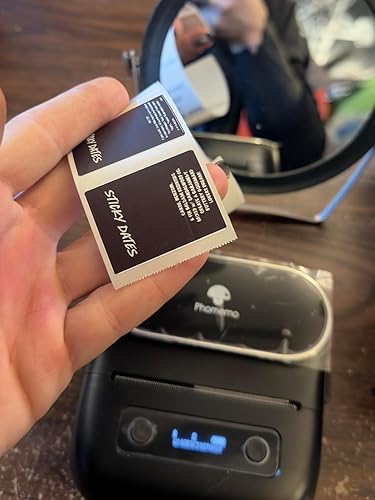


**** The Phomemo M220 Label Maker has garnered a positive reception from users, with multiple reviews highlighting its impressive performance and user-friendly features. Customers have noted the exceptional clarity of the labels, comparable to higher-end models like the MUNBYN 300dpi printer, with the added bonus of printing vibrant TRUE BLACK backgrounds that deliver a striking contrast with white text. This capability has drawn praise from users who struggled to achieve similar results with previous models. The refreshed Print Master app is another aspect that has delighted users, who appreciate its robust features compared to the bare-bones software provided with larger Phomemo printers. The ease of connecting the device to a smartphone is noted as a significant plus, enabling quick setup and immediate usability. Portability and speed are cited as standout features, with one user reporting the machine's capability to produce up to 50 labels in just 15 seconds, a stark contrast to the hours spent hand-labeling in the past. This efficiency makes it an appealing choice for both personal and professional use. Despite the predominantly positive feedback, there are some areas for improvement. A few users expressed a desire for the ability to use flat labels and for the Print Master software to be compatible with PCs, as they find it easier to design labels using a mouse. Nonetheless, the overall sentiment is that the Phomemo M220 offers excellent value for its price, with users looking forward to utilizing it for organization and labeling tasks effectively. **
Customer Reviews & Ratings
3487 customers ratings
-
5 Star
72%
-
4 Star
11%
-
3 Star
6%
-
2 Star
3%
-
1 Star
8%
Review this product
Share your thoughts with other customers
Pros
- High-quality, clear labeling capable of producing TRUE BLACK backgrounds with white text.
- User-friendly Print Master app with extensive features.
- Quick connectivity to smartphones.
- Fast printing speed (up to 50 labels in 15 seconds).
- Portable and easy to use, making it ideal for home and professional applications.
- No ink required, leading to cost savings.
Cons
- Limited to specific label types; some users wish for compatibility with flat labels.
Platform Trust & Buyer Confidence

DA
Dhoha
Verified buyer
“Was looking for chromatography filters and managed to find them and receive them in a short period of time. Great experience”
22 January 2026 · via Trustpilot
PP
Pretty
Verified buyer
“It was timely”
4 July 2026 · via Trustpilot
HA
hamza
Verified buyer
“Timely delivery and transparency”
19 February 2026 · via Trustpilot
MF
Mayerlyn
Verified buyer
“Excelente servicio y hasta la puerta de casa ??”
14 February 2026 · via Trustpilot
LR
Leon
Verified buyer
“The delivery time exceeded my expectations. The product was securely packaged.”
20-Jul-26 · via Trustpilot
Secure Checkout
Global Delivery
Easy Returns
Genuine Products
Top selling Bluetooth Label Maker in Qatar





Last Updated on July 30, 2026
Product Price History
Important information
- Limitations : For products shipped internationally, please note that any manufacturer warranty may not be valid; manufacturer service options may not be available; product manuals, instructions, and safety warnings may not be in destination country languages; the products (and accompanying materials) may not be designed in accordance with destination country standards, specifications, and labeling requirements; and the products may not conform to destination country voltage and other electrical standards (requiring use of an adapter or converter if appropriate). The recipient is responsible for assuring that the product can be lawfully imported to the destination country. When ordering from Ubuy or its affiliates, the recipient is the importer of record and must comply with all laws and regulations of the destination country.
- Not all the products listed on Ubuy are for sale, as Ubuy is a global search engine. Products are subject to export/trade regulations.
QAR 246
Order now and get it around Tuesday, August 18
This item is not restrict in my country.(Please click on above link if this item is not restrict in your country, So our team will review and allow.)
QTY:
Secured transaction
PCI DSS compliant and ISO 27001:2022 certified, with encrypted payments and full buyer protection on every order.
Our Top Logistics Partners
Fastest cross-border delivery
Features & Benefits
- Compact, multifunctional device for easy label printing.
- Utilizes thermal technology—no ink or toner needed.
- Built-in 2200mAh rechargeable battery for convenience.
- High compatibility with multiple operating systems.
- Fast printing with powerful Print Master app and templates.
- Increases productivity by eliminating handwriting labels.
Ubuy Assurance
Experience worry-free shopping with 100% original products, PCI DSS-compliant payment security, ISO 27001-certified data protection, the fastest cross-border delivery, free returns *, and secure packaging on every order.