



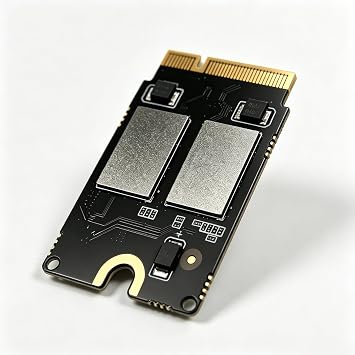
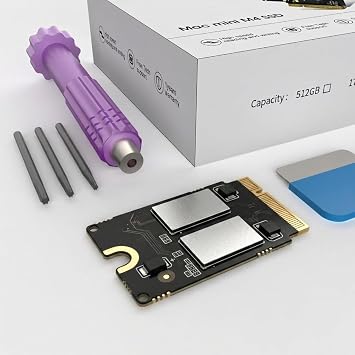
Mac mini M4 2TB SSD Hard Disk Upgrade DIY | SSD Upgrade for Mac mini M4, 3300MB/s High Speed, Easy Installation, Reliable Storage
Massive storage and high-speed performance for your Mac Mini M4!
Mac mini M4 2TB SSD Hard Disk Upgrade DIY | SSD Upgrade for Mac mini M4, 3300MB/s High Speed, Easy Installation, Reliable Storage
منتج #: 219460246

Mac mini M4 2TB SSD Hard Disk Upgrade DIY | SSD Upgrade for Mac mini M4, 3300MB/s High Speed, Easy Installation, Reliable Storage

منتج #: 219460246

QAR 1907

تفاصيل السعر

باستثناء رسوم الشحن والجمارك ( سيتم احتساب رسوم الشحن والجمارك عند إتمام الشراء )

*سيتم استيراد جميع العناصر من أمريكا

متوفر فى المخزون
أمريكا مستورد من متجر USA

كمية:

اطلب الآن واحصل عليه حول السبت, سبتمبر 19
أفضل شركائنا اللوجستيين
  • fedex
  • dhl
  • aramex
Massive storage and high-speed performance for your Mac Mini M4!
كفالة يو كير:
لا شيء
اختر الباقة
fast shipping

شحن
سريع

free return

استرجاع
مجاني*

تغليف آمن

تغليف آمن

منتجات أصلية %100

منتجات أصلية %100

pci-dss

الامتثال لمعيار PCI DSS

iso certified

حاصل على شهادة ISO 27001


paypal payment
visa payment
mastercard payment
Note: Step Down Voltage Transformer required for using electronics products of أمريكا store (110-120). Recommended power converters اشتري الآن.

مايفيد

Easy Installation
This DIY kit simplifies the hard disk upgrade process, allowing users to effortlessly enhance their Mac mini's storage without professional assistance, saving both time and money.
1TB Storage
Offering a spacious 1TB SSD, this upgrade significantly boosts file storage capacity, enabling users to store large applications, media, and files without worrying about running out of space.
High Performance
The M4 SSD enhances device performance, reducing load times and increasing data transfer speeds. Users can enjoy a more responsive system for demanding applications and multitasking.

تفاصيل المنتج

Shop Mac mini M4 2TB SSD Hard Disk Upgrade DIY | SSD Upgrade for Mac mini M4, 3300MB/s High Speed, Easy Installation, Reliable Storage online at a best price in قطر. B0DYJ2FQYG
Hardware InterfaceeSATA
Hardware Platformx86_64
Memory Storage Capacity2 TB
Compatible DevicesMac mini M4
Supported Devices Quantity4
Data Transfer Rate3300 megabits_per_second
Connectivity TechnologySATA
ColorM4-2TB
Enclosure MaterialAluminum
Item Weight0.02 kg
Brandsbaceflay
Unit Count1 Count
Number of Items1
Manufacturersbaceflay
UPC726899873371
Built-In MediaInstallation Guide
Model NumberM-2
Mfr Part NumberM4-2TB
MaterialAluminum

من يجب أن يشتري؟

Suitable For
  • Tech Enthusiasts

    Users who enjoy upgrading their hardware will appreciate the flexibility of a DIY SSD installation.

  • Content Creators

    Photographers and video editors will benefit from increased speed and capacity for storing large files.

  • Budget-Conscious Users

    Those looking to enhance their Mac mini's performance without purchasing a new model will find this upgrade viable.

Not Suitable For
  • Non-Technical Users

    Individuals unfamiliar with hardware upgrades may struggle with the installation process and require professional help.

وصف المنتج

Mac mini M4 2TB SSD Hard Disk Upgrade DIY | SSD Upgrade for Mac mini M4, 3300MB/s High Speed, Easy Installation, Reliable Storage

هل لديك أي استفسار؟ تحدث معنا

أسئلة العملاء & الإجابات

  • سؤال: What is a DIY SSD upgrade for the Mac mini M4?

    إجابه: A DIY SSD upgrade for the Mac mini M4 involves replacing the existing storage with a new 2TB SSD. This upgrade enhances overall performance by providing faster load times, improved application responsiveness, and increased data storage. By opting for a DIY approach, users can customize their storage solutions to meet specific needs without relying on pre-configured models. For those who frequently handle large files such as videos or games, this upgrade significantly reduces waiting times.
  • سؤال: How do I install a 2TB SSD in my Mac mini M4?

    إجابه: Installing a 2TB SSD in your Mac mini M4 requires specific tools and steps. First, ensure you have the right screwdriver set and an anti-static wrist strap. Then, open the Mac mini, disconnect the battery, and carefully remove the existing SSD. Insert the new 2TB SSD, reconnect all components, and close the case. Boot up your Mac, and format the new SSD in Disk Utility. This process allows you to expand your storage capacity, greatly improving your system's speed and efficiency.
  • سؤال: What benefits does a 2TB SSD provide for my Mac mini M4?

    إجابه: Upgrading to a 2TB SSD offers substantial benefits, including increased speed, reliability, and storage space. An SSD significantly reduces boot times and file access speeds, allowing you to work more efficiently. Additionally, with 2TB, you can store a vast amount of data, accommodating everything from programming files to high-resolution images and large media libraries. This allows for a clutter-free experience, facilitating better productivity and seamless multitasking.
  • سؤال: Will upgrading to a 2TB SSD void my Mac mini M4's warranty?

    إجابه: Generally, performing a DIY upgrade may impact your warranty, as Apple considers opening the device for repairs or upgrades outside their authorized channels. It's recommended to check your warranty terms before proceeding. However, many users find that the performance benefits far outweigh the risks, particularly for those whose needs exceed the factory specifications. If necessary, keep documentation of the upgrade process for future reference or discussions with Apple Support.
  • سؤال: What tools do I need for the Mac mini M4 SSD upgrade?

    إجابه: To upgrade the SSD in your Mac mini M4, you will need a few essential tools: a precision screwdriver set, specifically a Torx T5 and T8, an anti-static wrist strap, and possibly a plastic pry tool to safely open the device. These tools ensure that you can efficiently perform the upgrade without damaging components. With the right tools and careful handling, you can effectively install your new 2TB SSD and enhance your system's performance.
  • سؤال: Can I use any brand of 2TB SSD for the upgrade?

    إجابه: While you can use various brands for your Mac mini M4 SSD upgrade, it's crucial to choose a compatible one that offers high performance and reliability. Look for SSDs that are specifically designed for Mac systems or those that have a proven track record with them. Brands like Samsung, Crucial, and Western Digital are highly recommended due to their superior speed and warranty support, which guarantees a smoother upgrade experience and long-term functionality.
  • سؤال: Is there a performance difference between SATA and NVMe SSDs?

    إجابه: Yes, there is a notable performance difference between SATA and NVMe SSDs. NVMe drives use the PCIe interface, providing significantly faster read/write speeds compared to SATA SSDs. For a Mac mini M4, selecting an NVMe SSD is ideal, as it can handle high-speed data transfer and multi-tasking better, which is invaluable for power users accessing large files or running intensive applications. This means smoother performance, especially in demanding work scenarios like video editing.
  • سؤال: How much storage do I really need for my Mac mini M4?

    إجابه: The storage needs for your Mac mini M4 largely depend on your usage habits. For casual users, 1TB might suffice for everyday tasks and software usage, while professionals dealing with large media files or multiple applications might benefit more from a 2TB SSD. Assess your current storage use and anticipate future needs for growth. If you frequently save heavy files, an upgrade offers better flexibility and peace of mind, ensuring you won't run out of space when you need it most.
  • سؤال: Can I clone my existing Mac mini M4 SSD to the new 2TB SSD?

    إجابه: Yes, you can clone your existing Mac mini M4 SSD to the new 2TB SSD using cloning software like Carbon Copy Cloner or SuperDuper. This process ensures a seamless transition, allowing you to keep all your applications, settings, and data intact. After upgrading, simply boot from the new drive, and everything works as it did before, but with significantly more space and improved performance. This method minimizes downtime and makes the upgrade process less daunting.
  • سؤال: Where can I buy the Mac mini M4 SSD 2TB Hard Disk Upgrade DIY?

    إجابه: You can purchase the Mac mini M4 SSD 2TB Hard Disk Upgrade DIY at Ubuy in Qatar. Ubuy offers a wide range of compatible SSD options specifically designed for the Mac mini M4, ensuring you find the right fit for your upgrade needs. They provide detailed product descriptions and customer support, making it easier to choose the ideal upgrade for your device.

sbaceflay Internal Components M-2 Editorial Review

Mac mini M4 2TB SSD Hard Disk Upgrade DIY | SSD Upgrade for Mac mini M4, 3300MB/s High Speed, Easy Installation, Reliable Storage offers an impressive upgrade for Mac mini M4 users. With a data transfer rate of 3300 MB/s and a robust 2 TB storage capacity, it promises enhanced performance for demanding tasks, such as video editing. Many users have found the installation straightforward, especially when following guides from iFixit and various YouTube channels. Although some encountered initial issues with installation or defective units, overall satisfaction seems high, particularly regarding speed boosts which have been noted even after several months of use. Keep in mind the importance of careful installation for the best results.

مراجعات العملاء وتقييماتهم

1 تقييمات العملاء
  • 5 نجمة
    100%
  • 4 نجمة
    0%
  • 3 نجمة
    0%
  • 2 نجمة
    0%
  • 1 نجمة
    0%

أضف تقييم لهذا المنتج

شارك أفكارك مع عملاء آخرين

إيجابيات

  • Upgrades storage to 2TB easily
  • High data transfer rate at 3300MB/s
  • Installation guides available online
  • Compatible with Mac mini M4
  • Aluminum enclosure for durability

سلبيات

  • Initial installation may require some patience

منصة موثوقة وثقة كاملة للمشتري

DA
Dhoha
مشتري موثّق

“Was looking for chromatography filters and managed to find them and receive them in a short period of time. Great experience”

22 January 2026 · عبر Trustpilot
PP
Pretty
مشتري موثّق

“It was timely”

4 July 2026 · عبر Trustpilot
HA
hamza
مشتري موثّق

“Timely delivery and transparency”

19 February 2026 · عبر Trustpilot
MF
Mayerlyn
مشتري موثّق

“Excelente servicio y hasta la puerta de casa ??”

14 February 2026 · عبر Trustpilot
LR
Leon
مشتري موثّق

“The delivery time exceeded my expectations. The product was securely packaged.”

20-Jul-26 · عبر Trustpilot
الخروج الآمن شحن عالمي إسترجاع سهل منتجات أصلية

معلومات مهمة

  • القيود: بالنسبة للمنتجات التي يتم شحنها دولياً، يُرجى ملاحظة أن أي ضمان من الشركة المصنعة قد لا يكون صالحاً؛ قد لا تتوفر خيارات خدمة الشركة المصنعة؛ قد لا تكون أدلة المنتج والتعليمات وتحذيرات السلامة مكتوبة بلغة بلد المقصد؛ قد لا يتم تصميم المنتجات (والمواد المصاحبة لها) وفقاً لمعايير بلد الوجهة والمواصفات ومتطلبات الملصقات؛ وقد لا تتوافق المنتجات مع الجهد الكهربي المستخدم في بلد الوجهة والمعايير الكهربائية الأخرى (تتطلب استخدام محوّل كهربي أو جهاز تحويل إذا كان ذلك مناسباً). المستلم مسؤول عن ضمان إمكانية استيراد المنتج بشكل قانوني إلى بلد الوجهة. عند الطلب من يوباي أو الشركات التابعة لها، يكون المستلم هو المستورد المسجل ويجب أن يلتزم بجميع القوانين واللوائح الخاصة ببلد الوجهة.
  • ليست كل المنتجات المدرجة على يوباي معروضة للبيع، لأن يوباي هو محرك بحث عالمي. المنتجات تخضع للوائح التصدير / التجارة.