- الصفحة الرئيسية /
- إلكترونيات /
- إكسسوارات الكمبيوتر /
- Computer Accessories & Peripherals /
- Keyboards, Mice & Accessories /
- Keyboard & Mouse Combos /
- Microsoft Optical Desktop Elite for Bluetooth




منتج #:
136603145
Microsoft Optical Desktop Elite for Bluetooth
65% من المشترين سيوصون بهذا المنتج لصديق
منتج #:
136603145
QAR 1194
تفاصيل السعر
باستثناء رسوم الشحن والجمارك ( سيتم احتساب رسوم الشحن والجمارك عند إتمام الشراء )
*سيتم استيراد جميع العناصر من أمريكا
0 ratings
اكتب رأيك
متوفر فى المخزون
 مستورد من متجر USA
كمية:
بقي 3 فقط من المنتج في المخزن.
اطلب الآن واحصل عليه حول الخميس, سبتمبر 24
معاملة آمنة
تعمل يوباي جاهدة لحماية أمنك وخصوصيتك. يضمن نظام أمان الدفع المتقدم لدينا السرية من خلال تشفير معلوماتك أثناء النقل باستخدام بروتوكولات AES (معايير التشفير المتقدمة) وSSL (طبقة المنافذ الآمنة). تفاصيل الدفع الخاصة بك آمنة بنسبة %100 لأننا لا نشارك تفاصيل الدفع الخاصة بك مع بائعين تابعين لجهات خارجية
أفضل شركائنا اللوجستيين


Experience the freedom of seamless connectivity with Microsoft's Bluetooth products, designed for ultimate synchronization and sharing.

شحن
سريع

استرجاع
مجاني*

تغليف آمن

منتجات أصلية %100

الامتثال لمعيار PCI DSS

حاصل على شهادة ISO 27001



Note: Step Down Voltage Transformer required for using electronics products of أمريكا store (110-120). Recommended power converters اشتري الآن.


مايفيد
Bluetooth Connectivity
Enjoy seamless wireless connections without the clutter of wires. This feature ensures compatibility with a wide range of devices and easy setup, enhancing your mobility and workspace organization.
Ergonomic Design
Designed for comfort, the Optical Desktop Elite reduces strain during long usage sessions. Its ergonomic shape promotes a healthier posture, making it ideal for professionals and gamers alike seeking comfort without compromising performance.
Advanced Optical Technology
Experience precision and reliability with advanced optical tracking. This technology ensures smooth navigation and accurate response times, making it perfect for designers and gamers who demand the best in performance.
تفاصيل المنتج
| Connectivity Technology | Bluetooth, Usb, Wireless |
| Other Special Features of the Product | Wireless |
| Compatible Devices | Personal Computer |
| Movement Detection | Optical |
| Keyboard Backlighting Color Support | Single Color |
| Power Source | Battery Powered |
| Keyboard Layout | QWERTY |
| Compatible Operating System Family | Windows |
| Hand Orientation | Ambidextrous |
| Operating System | Windows |
| Number of Keys | 105 |
| Color | Black/Blue |
| Item Weight | 4 pounds (1.81 kg) |
| Brand | Microsoft |
| Keyboard Description | QWERTY |
| Antenna Location | Office |
| Number of Packs | 1 |
| Manufacturer | Microsoft |
| Unit Count | 1 Count |
| UPC | 805529382473 |
| Global Trade Identification Number | 00805529382473 |
| Built-In Media | Keyboard, Mouse |
| Model Number | M54-00013 |
| Mfr Part Number | M54-00013 |
| Special Feature | Wireless |
ما بداخل الصندوق
Keyboard
Mouse
من يجب أن يشتري؟

-
Bluetooth Users
Ideal for users who need wireless connectivity without the hassle of cables, enhancing workspace organization and mobility.
-
Office Professionals
Perfect for professionals who value productivity features like adjustable DPI settings and ergonomic design for long hours.
-
Mac Users
Designed to work well with MacOS, providing seamless integration and functionality for those in the Apple ecosystem.

-
Gaming Enthusiasts
Not suitable for gamers who require high-speed response times and precision, as it may lag in fast-paced environments.
وصف المنتج
هل لديك أي استفسار؟ تحدث معنا
أسئلة العملاء & الإجابات
-
سؤال:
كيف تتسوق Microsoft Optical Desktop Elite for Bluetooth عبر الانترنت من يوباى?
إجابه: من السهل التسوق في Microsoft Optical Desktop Elite for Bluetooth عبر الإنترنت من يوباي. كل ما عليك فعله هو البحث عن المنتج واختيار طريقة الشحن الخاصة بك أثناء الدفع وسيتم توصيله الى عنوانك -
سؤال:
هل Microsoft Optical Desktop Elite for Bluetooth متوفر للتسوق عبر الإنترنت في Qatar؟
إجابه: نعم ، في يوباي Qatar هذا المنتج متاح لك للتسوق بسعر مناسب. Microsoft Optical Desktop Elite for Bluetooth غير متوفر محليًا ولكن يمكنك الوثوق بنا بخدماتنا للشحن السريع. -
سؤال:
كم من الوقت يستغرق الحصول على المنتج بعد تقديم الطلب؟
إجابه: يختلف وقت تسليم المنتج الذي طلبته حسب ما طلبته وطريقة الشحن التي اخترتها. يتم ذكر وقت التسليم المقدر أثناء عملية الدفع ، لذا كن مرتاحًا أثناء التسوق.
Microsoft Keyboard & Mouse Combos M54-00013 Editorial Review


لم يتم العثور على مراجعات تحريرية
مراجعات العملاء وتقييماتهم
84 تقييمات العملاء
-
5 نجمة
22%
-
4 نجمة
15%
-
3 نجمة
11%
-
2 نجمة
20%
-
1 نجمة
32%
أضف تقييم لهذا المنتج
شارك أفكارك مع عملاء آخرين
تاريخ سعر المنتج
معلومات مهمة
- القيود: بالنسبة للمنتجات التي يتم شحنها دولياً، يُرجى ملاحظة أن أي ضمان من الشركة المصنعة قد لا يكون صالحاً؛ قد لا تتوفر خيارات خدمة الشركة المصنعة؛ قد لا تكون أدلة المنتج والتعليمات وتحذيرات السلامة مكتوبة بلغة بلد المقصد؛ قد لا يتم تصميم المنتجات (والمواد المصاحبة لها) وفقاً لمعايير بلد الوجهة والمواصفات ومتطلبات الملصقات؛ وقد لا تتوافق المنتجات مع الجهد الكهربي المستخدم في بلد الوجهة والمعايير الكهربائية الأخرى (تتطلب استخدام محوّل كهربي أو جهاز تحويل إذا كان ذلك مناسباً). المستلم مسؤول عن ضمان إمكانية استيراد المنتج بشكل قانوني إلى بلد الوجهة. عند الطلب من يوباي أو الشركات التابعة لها، يكون المستلم هو المستورد المسجل ويجب أن يلتزم بجميع القوانين واللوائح الخاصة ببلد الوجهة.
- ليست كل المنتجات المدرجة على يوباي معروضة للبيع، لأن يوباي هو محرك بحث عالمي. المنتجات تخضع للوائح التصدير / التجارة.
QAR 1194
اطلب الآن واحصل عليه حول الخميس, سبتمبر 24
هذا المنتج غير ممنوع في بلدي. (الرجاء الضغط على الرابط أعلاه إذا لم يكن هذا المنتج ممنوعاً في بلدك ، لذلك سيقوم فريقنا بمراجعته والسماح به.)
كمية:
بقي 3 فقط من المنتج في المخزن.
معاملة آمنة
نوفر لك مدفوعات مشفّرة، وحماية متكاملة للمشتري، مع الالتزام بمعايير PCI DSS وشهادة ISO 27001:2022 لضمان أعلى مستويات الأمان في كل عملية شراء.
أفضل شركائنا اللوجستيين
أسرع توصيل عبر الحدود
المميزات والفوائد
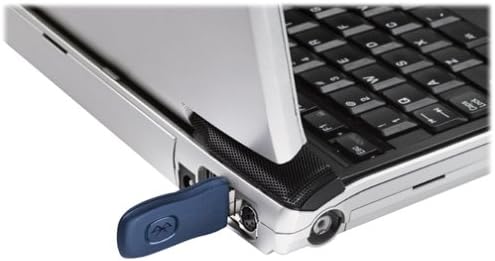
- Enhances connectivity between PCs and mobile devices.
- Includes a Bluetooth mouse and keyboard for superior performance.
- Offers extended range, reliability, and security.
- Facilitates wireless synchronization of calendars and contacts.
- Features side-to-side scrolling capability.
- Optimized for Windows PCs with longer battery life.
ضمان Ubuy
تسوّق بثقة مع منتجات أصلية %100، ومدفوعات آمنة متوافقة مع معيار PCI DSS، وحماية بيانات معتمدة وفق ISO 27001، وشحن دولي سريع، وإرجاع مجاني*، وتغليف آمن لكل طلب.